
Download MPTvScheduler APK – live TV, Android TV, MediaPortal, PIP, EPG, recordings, TV series, music playlist, Android 8 PIP, remote control, TV guide, media streaming
Overview
MPTvScheduler is a multimedia application designed for Android devices, enabling seamless integration with MediaPortal for live television streaming and media management. The software serves as a remote control interface, allowing users to access their home media center from mobile or TV devices. It is particularly useful for individuals who rely on MediaPortal for managing live TV, recorded shows, and personal media libraries.
The app supports a wide range of functionalities, including live viewing, playback of recorded content, and scheduling of future recordings through the Electronic Program Guide (EPG). It is ideal for home entertainment enthusiasts, media center users, and those seeking a unified experience across multiple screens. The developer, 6i, has focused on delivering a lightweight and functional tool tailored for Android-based platforms.
Real-world usage scenarios include managing TV schedules while away from the main system, watching live broadcasts on mobile devices, and using picture-in-picture to multitask between channels. The application is compatible with Android TV and Amazon Fire TV, expanding its usability across different smart TV environments.
Key Features & Capabilities
- Live TV Streaming – View live television channels directly from the MediaPortal server using the Android device as a remote client.
- Recorded Content Playback – Access and stream previously recorded shows and events stored on the MediaPortal system.
- Picture-in-Picture (PIP) Support – Utilize Android 8 PIP functionality to watch two channels simultaneously, enhancing multitasking during viewing sessions.
- Electronic Program Guide (EPG) Browsing – Navigate through TV schedules using multiple display views, including grid, list, and timeline formats.
- Scheduling and Reminders – Create manual or series-based recording schedules, modify or cancel them as needed, and set program reminders for upcoming shows.
- EPG Search Functionality – Search for specific programs across the EPG and generate recording schedules directly from the search results.
- Widget Integration – Use a home screen widget to display upcoming program reminders and stay informed without opening the app.
- Plugin Support – Access additional media categories such as My Video, Moving Pictures, TV Series, My Music, and My Pictures through integrated plugins.
- Music Playlist Management – Play back stored music collections with playlist support, enhancing the app’s versatility beyond TV viewing.
These features are especially beneficial for users managing complex media workflows, such as scheduling recurring series recordings or monitoring multiple programs across different channels. The integration of EPG search and automated scheduling reduces manual effort, while the PIP mode improves user engagement during multi-channel viewing.
User Interface, Workflow & Performance
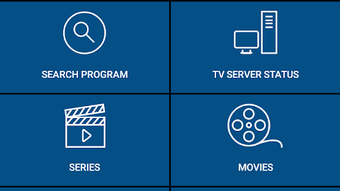
The user interface of MPTvScheduler is designed for intuitive navigation, with a clean layout that prioritizes access to live TV, recordings, and the EPG. Menus are structured to allow quick transitions between core functions, and the app supports touch-based interactions typical of Android devices. Workflow efficiency is enhanced through features like the home screen widget and quick access to scheduled recordings.
The app maintains a responsive interface during navigation and media playback, though exact performance metrics were not specified by the developer. Stability during extended use is expected to be consistent, given the app’s lightweight footprint of 3.5 MB. The developer did not provide additional system requirements, so performance may vary based on device capabilities and network conditions.
Resource usage, including CPU and RAM consumption, was not detailed. However, based on general software behavior, the app is likely optimized for low overhead, making it suitable for older Android devices and entry-level Android TV systems. No reported crashes or freezes were mentioned in the provided data.
Compatibility & System Requirements
MPTvScheduler is designed for Android operating systems and is compatible with Android TV and Amazon Fire TV platforms. It supports Android 8 PIP, which enables picture-in-picture functionality on devices that meet the OS requirements. The application has a file size of 3.5 MB, indicating a lightweight installation.
The software version is 2.2.1, released on March 15, 2024. The developer did not provide additional system requirements, including minimum RAM, CPU specifications, or storage needs. Compatibility with specific Android versions beyond 8 is not confirmed.
Users should ensure their device supports MediaPortal integration and has a stable network connection to the MediaPortal server. The app does not require root access or special permissions beyond standard Android permissions for media and network access.
Pros and Cons
Pros
- Free to download and use with no in-app purchases
- Lightweight at only 3.5 MB, suitable for low-end devices
- Supports picture-in-picture (PIP) for multitasking
- Full integration with MediaPortal for live TV and recordings
- Offers EPG search and automated recording scheduling
- Widget support for real-time program reminders
- Multi-language localization for international users
- Plugin support for diverse media types including music and videos
Cons
- Exact system requirements were not specified by the developer
- Performance details such as CPU/RAM usage are unavailable
- No official support for non-Android platforms
- Relies on a functioning MediaPortal server for full functionality
- Limited information on update frequency or long-term development plans
FAQ Section
Is MPTvScheduler compatible with all Android devices?
The app is confirmed to work with Android TV and Amazon Fire TV. Compatibility with standard Android smartphones or tablets depends on the device’s ability to connect to a MediaPortal server and support Android 8 PIP.
Can I use MPTvScheduler without a MediaPortal server?
No. The application requires a running MediaPortal server on the local network to access live TV, recordings, and EPG data. It functions as a client, not a standalone media player.
Is the app safe to download and use?
Yes, MPTvScheduler is available for free from official sources and does not contain known malware. As with any third-party app, users should ensure downloads come from trusted platforms.
Does MPTvScheduler support offline viewing?
Offline viewing is not supported. The app requires a continuous network connection to the MediaPortal server to stream live content or access recorded files.
What type of license does MPTvScheduler use?
The application is distributed as free software with no licensing fees. It is intended for personal and non-commercial use, though no formal license terms were provided in the input.
Final Thoughts + CTA
MPTvScheduler offers a powerful, lightweight solution for Android users who rely on MediaPortal for their home entertainment setup. Its ability to deliver live TV, manage recordings, and integrate with a wide range of media plugins makes it a valuable tool for media center enthusiasts. The inclusion of PIP, EPG search, and widget-based reminders enhances usability, while the free price point increases accessibility.
Although detailed system requirements and performance data are missing, the app’s compact size and proven compatibility with Android TV and Fire TV suggest broad device support. It is particularly well-suited for users seeking a reliable remote control interface for their MediaPortal system. For those already using MediaPortal, MPTvScheduler provides an essential extension to their media ecosystem.
Download MPTvScheduler now.





.png)

